Skip to content

Bank reconciliationBlock management software

Automated bank reconciliation in seconds, not weeks.

WiseBlock connects to each building's bank account over Open Banking, brings the statements in, and matches every line to the building's ledger. The few it can't be sure of go to your accountant with a suggested answer — so a quarter end is a few decisions, not a few weeks of ticking.

  • ConnectionOpen Banking, read-only — it can see, never pay
  • MatchingEvery bank line against the building's ledger
  • ExceptionsSent to a person, with a suggested answer
  • RecordWho confirmed what, and when
Bank statementHawley Crescent Tower

September 2026Service charge account
Sort code 20-00-00

  • FLAT 4 SC SEP01/09/2026+£185.00
  • BRIGHTWAY CLEANING03/09/2026−£420.00
  • RIVERSIDE UTIL DD08/09/2026−£212.40
  • FLAT 12 TFR14/09/2026 · two invoices, one payment+£1,250.00?
  • HARTLEY ROOFING22/09/2026−£3,816.00
Matched against the building's ledger 144 of 146 matched

Illustrative statement from the demo building.

Sheet 01A quarter, reconciled

Watch three months of statements meet the ledger.

The building's ledger is already there. The bank connects, three statements come down, the agent matches them, and the two lines it won't guess at go to the accountant.

  1. Connected
  2. Downloaded
  3. Matched
  4. Reviewed
  5. Reconciled

An illustrative example: Hawley Crescent Tower, its residents, suppliers and figures are fictional.

Sheet 02The connection

A read-only Open Banking connection.

Each building's account is connected through Open Banking, the regulated way UK banks share account data with software you authorise. The connection is read-only: WiseBlock can see the statement lines, and it cannot move a penny.

Statements come in by period — a month, a quarter, the whole service charge year — and stay attached to the building they belong to. If an account isn't connected, statements can still be uploaded as PDF or CSV, and the Bank Specialist agent reads the lines out of them.

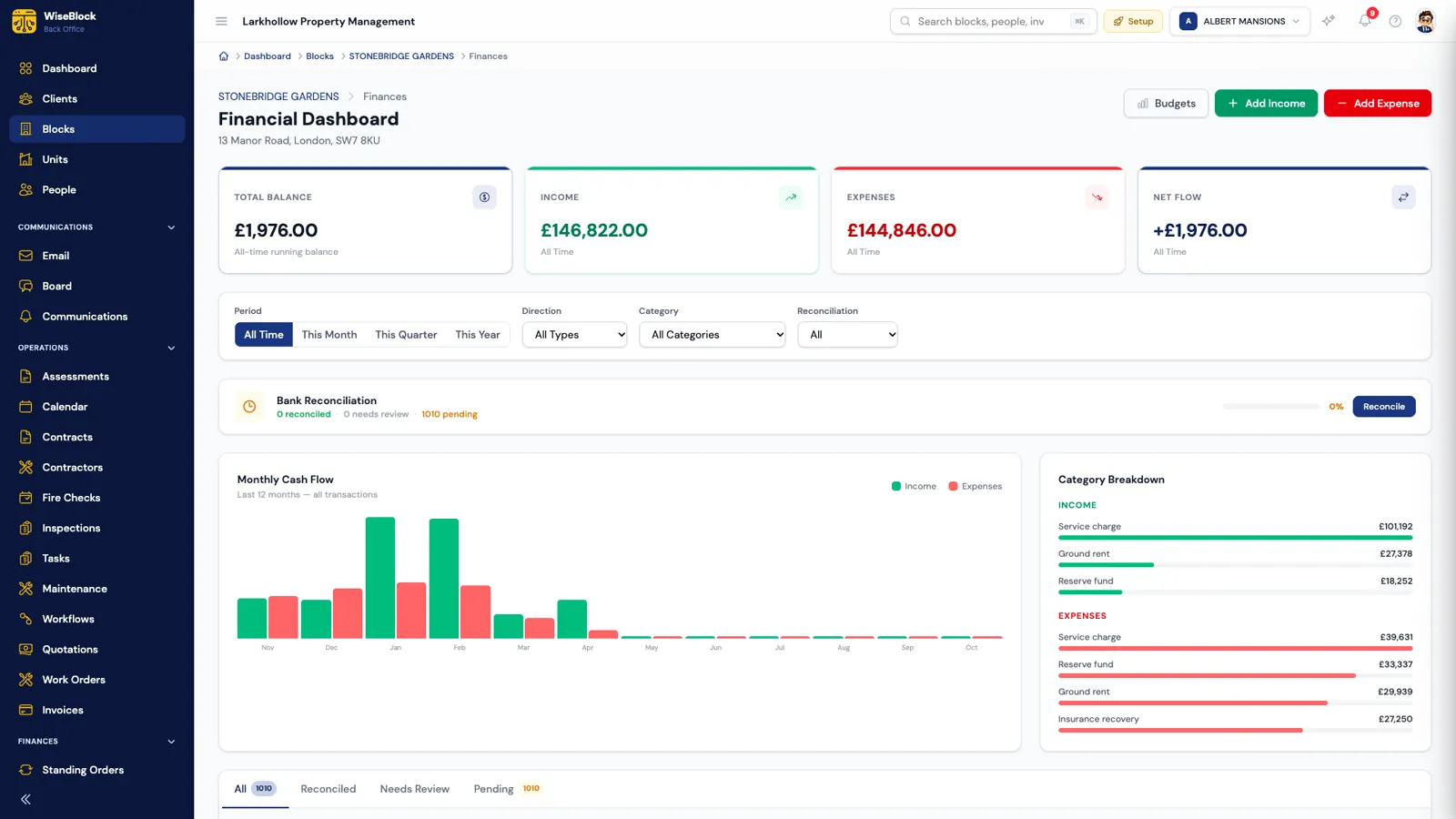
A building's financial dashboard in WiseBlock: balance, income and expenses, a monthly cash-flow chart, spending by category, and the bank reconciliation status.
  1. One ledger per building.

    Income and spend are kept against the block they belong to, never pooled across the portfolio.

  2. Spend by heading.

    Every debit is filed under a budget heading, so a reconciled quarter also tells you where the money went.

Sheet 03How matching works

Every line, matched against the ledger.

Matching is the slow part of reconciliation, and the part the agent does. It reads each bank line the way your accountant would.

  1. Statements arrive

    Lines come in over Open Banking, or are read from an uploaded PDF or CSV, against the right building and period.

  2. The agent matches

    Each line is compared with the building's ledger — amount, date, reference and payee — including one payment that settles several entries.

  3. Unsure goes to a person

    When two entries fit equally well, or nothing fits, the line is marked for review with what the agent thinks it is.

  4. The quarter closes

    Matched lines are reconciled and the bank balance is checked against the ledger.

Sheet 04Exceptions

The agent won't guess. Your accountant decides.

A payment of £1,250 referenced "FLAT 12 TFR", when Flat 12 and Flat 21 both owe exactly £1,250, is not a coin toss. WiseBlock marks it needs review and puts it in front of the person who signs the accounts off, with the reference it read and the match it would suggest.

The same goes for a line with nothing behind it in the ledger — a bank charge, say. The accountant can match it, or add the missing entry under the right heading in one step.

Sheet 05The record

A reconciliation you can audit.

Service charge accounts are read by leaseholders, auditors and, sometimes, a tribunal. The trail is part of the job.

  • Who and when

    Every reconciled entry records the person who confirmed it and the time they did.

  • Per building, per period

    Statements and matches stay with the building and the period they belong to, so one block's quarter never leaks into another's.

  • The statement behind it

    Uploaded statements are kept with the reconciliation, so the evidence for every line is one click away.

  • Balances that agree

    Once a quarter is matched, the bank balance and the ledger balance are shown side by side.

Questions

Bank reconciliation, answered.

Can WiseBlock move money from the building's account?

No. The Open Banking connection is read-only: it can see statement lines and balances, and it cannot make payments.

What if a building's bank isn't connected?

Upload the statement as a PDF or CSV. The Bank Specialist agent reads the lines out of it, and they are matched exactly the same way.

What happens to lines the agent can't match?

They are marked needs review and sent to a person — usually your accountant — with the agent's suggested match and the reason it wasn't sure. Nothing is reconciled on a guess.

Does this replace our accountant?

No. It takes the matching off their desk so their time goes on the decisions only they can make: the exceptions, and signing the accounts off.

Can one payment settle several entries?

Yes. A single bank line can be matched to several ledger entries, and several bank lines to one entry, which is how real payments often arrive.

Next step

See your next quarter end on your own blocks.

A 30-minute demo on a portfolio like yours: fire safety, repairs, residents and service charges, with the agents switched on.