Skip to content

Invoice approvalAccounts payable automation

Contractor invoice approval, checked before you've opened it.

A contractor emails their invoice to the building. WiseBlock reads it, matches it to the work order it quotes, and checks it for the mistakes that cost real money — the wrong customer, the wrong firm, the same bill twice, more than was agreed. When you approve it, the ledger entry is written for you.

  • ArrivesBy email, the contractor portal or upload
  • MatchedTo the work order reference on the document
  • CheckedSeven checks before it reaches you
  • PostedTo the building's ledger, under its budget heading
InvoiceHartley Roofing Ltd

HR-2291Dated 16/10/2026
Due 15/11/2026

  • Work orderHawley Crescent Tower · roof leak over stairwellWO-2026-0142
  • Scaffold, 3 lifts, 2 weeks£1,240.00
  • Strip and relay valley, lead flashing£1,560.00
  • Make good stairwell ceiling£380.00
  • VAT at 20%£636.00

Total£3,816.00

Matched to the accepted quote · charged to Repairs & Maintenance 7 of 7 checks

Illustrative invoice from the demo building.

Sheet 01An invoice, checked

Watch a roofer's bill go from inbox to ledger.

The invoice lands in the building's inbox. The agent reads it, finds the work order, runs the checks, and leaves the decision to the property manager.

  1. Arrives
  2. Read
  3. Matched
  4. Checked
  5. Approved
  6. In the ledger

An illustrative example: the building, contractor, invoice and figures are fictional.

Sheet 02Invoice matching

How invoice matching works.

The work order reference is what makes an invoice checkable at all: it says what was ordered, by whom, for which building and at what price.

  1. It arrives

    Emailed to the building's own address, sent through the contractor portal, or dropped in by your team as a PDF or photo.

  2. It is read

    The document is read for the supplier, who it's addressed to, the invoice number and dates, net, VAT and total, the currency, and any work order reference like WO-2026-0001.

  3. It is matched

    With a reference, the invoice knows its job, its building, its budget heading and who approves it, and joins the approval queue.

  4. Or it is parked

    With no reference, it waits as a draft against the building it was emailed to, and the property manager is told it needs placing. It never just disappears.

Sheet 03The seven checks

Seven checks for the quiet, expensive mistakes.

The costly errors in accounts payable aren't typos. They're invoices where every figure looks fine. Each of these is checked on every invoice read from a document, and shown on it before anyone sends it on.

  • Addressed to someone else

    The bill-to name isn't your organisation, so it may be one of the contractor's other customers' invoices, filed here by mistake.

  • Unknown work order

    It quotes a work order that doesn't exist here, or quotes none at all and needs a person to pick the right job.

  • Supplier mismatch

    The work order was awarded to one firm and the invoice is from another. "Ltd" against "Limited" doesn't count as different.

  • Possible duplicate

    The same contractor's invoice number is already in the system, whatever its status. Paying it twice is the expensive one.

  • Job not finished

    The work order hasn't been marked finished, so nobody has confirmed the work happened.

  • Over the agreed price

    The total is more than was agreed on the work order, by anything beyond a penny, and the difference is shown in pounds.

  • Wrong currency

    The invoice isn't in pounds sterling, so the figures need a second look before they're treated as GBP.

Sheet 04Approval

From email to ledger in one click.

Approving an invoice isn't a status change. It writes a debit against the building, in the fiscal year the invoice falls in, carrying both the contractor's reference and the work order's, so somebody reconciling a bank line months later can trace it straight back.

If that entry can't be written, the approval doesn't happen. WiseBlock refuses to approve an invoice when the work isn't finished, when there's no building to charge it to, or when there's no open fiscal year for its date — and says which.

The agent reads, matches and checks. It never approves. That stays with the person who answers for the building's money, and the record shows who approved it and when.

Sheet 05Budget heading

The budget heading carried the length of the chain.

A repair is charged to a budget heading when it's logged — Repairs & Maintenance by default. The request for quotation inherits it, the work order carries it, and the ledger entry an approved invoice becomes keeps it.

That's what makes three-way matching worth doing in block management: the order, the work and the bill agree, and the money lands where it was budgeted. The building's budget page can then say whether it's Cleaning or Repairs that's running out, not just that total spend is high.

Bills with no work order behind them, such as an annual service contract, can still be approved against the building directly.

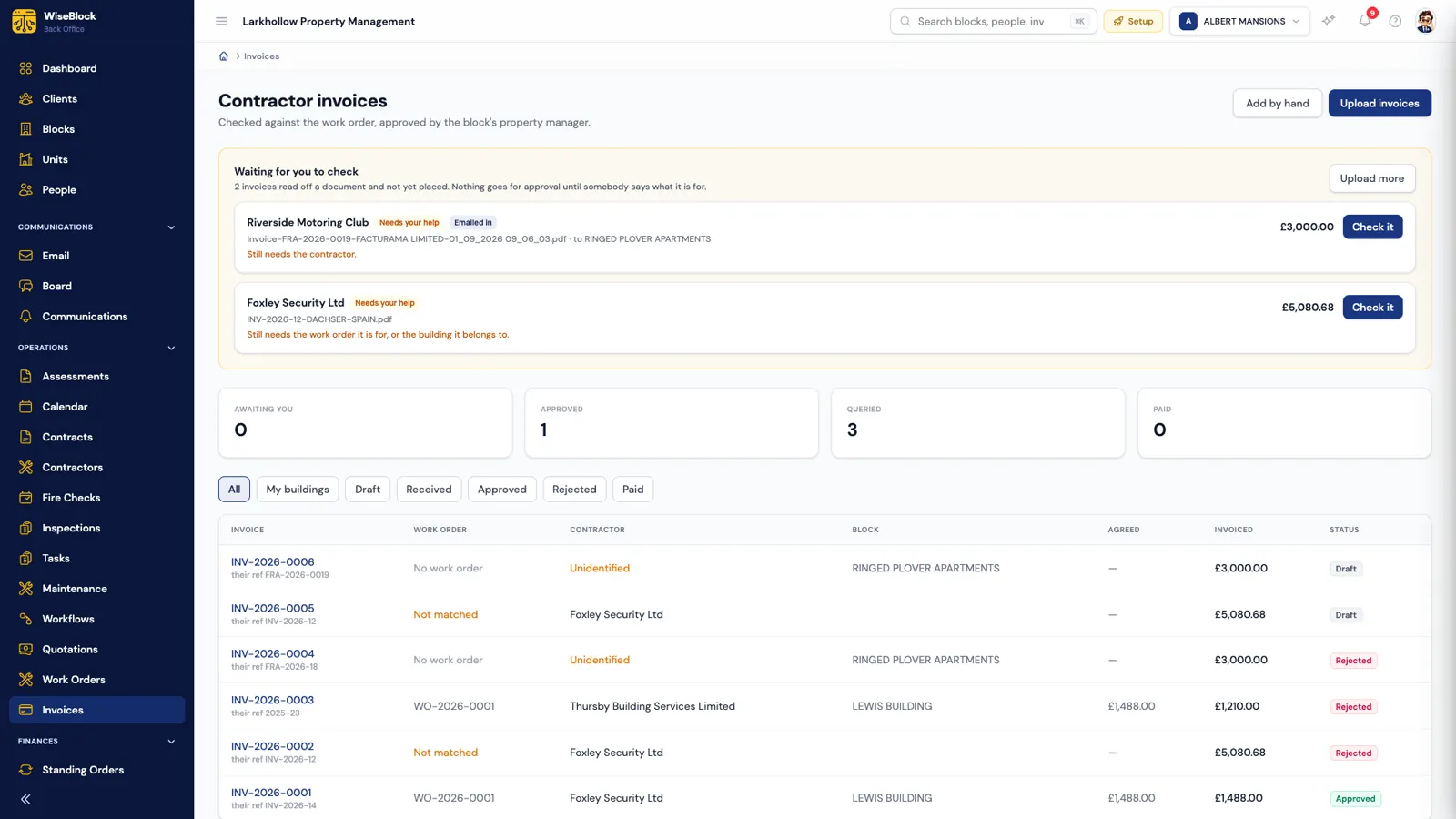
The contractor invoices list in WiseBlock: a 'Waiting for you to check' panel with two emailed invoices that still need a contractor or work order, counts of invoices awaiting, approved, queried and paid, and a table of invoices with work order, contractor, block, agreed and invoiced amounts and status.
  1. Waiting for you to check.

    Invoices read off a document but not yet placed. Nothing goes for approval until somebody says what it's for.

  2. The work order, or why not.

    Each invoice shows the job it was matched to, or that it wasn't matched.

  3. Agreed against invoiced.

    The price on the work order beside the amount billed, so a difference shows before you approve.

Questions

Invoice approval, answered.

Does WiseBlock approve or pay invoices automatically?

No. It reads, matches and checks them. Approving is a person's decision, and approving writes the ledger entry; payment is made the way you pay today.

What if a contractor doesn't quote a work order number?

The invoice is kept as a draft against the building whose address it was emailed to, and the building's property manager (or your administrators, if there isn't one) is told it needs placing. A person picks the job or confirms it has none.

How are duplicate invoices caught?

When an emailed invoice repeats an invoice number already received for the same job or building, it isn't filed twice. On every invoice read from a document, the same contractor's invoice number is also checked against everything already in the system.

Can we approve an invoice for work that isn't finished?

No. The work order has to be marked finished first, because nobody has otherwise confirmed the work happened.

Can contractors send invoices through a portal?

Yes. Contractors who use the WiseBlock contractor portal can submit invoices against their work orders there, as well as by email.

Next step

See your next invoice checked before you open it.

A 30-minute demo on a portfolio like yours: fire safety, repairs, residents and service charges, with the agents switched on.