Skip to content

Maintenance & repairsProperty maintenance software

Property maintenance management, from one photo to fixed.

A resident reports a leak with a photo. WiseBlock drafts the job from it, asks the right local contractors for a price, checks the cheapest against the building's approval limit and its budget, and puts the decision in front of a person. The resident watches it move from reported to resolved without having to chase.

  • ReportedPortal, app, email, phone or a site visit
  • DraftedTitle, urgency and trades read from the photos
  • PricedVerified contractors local to the building
  • ApprovedAgainst the whole job, by a person
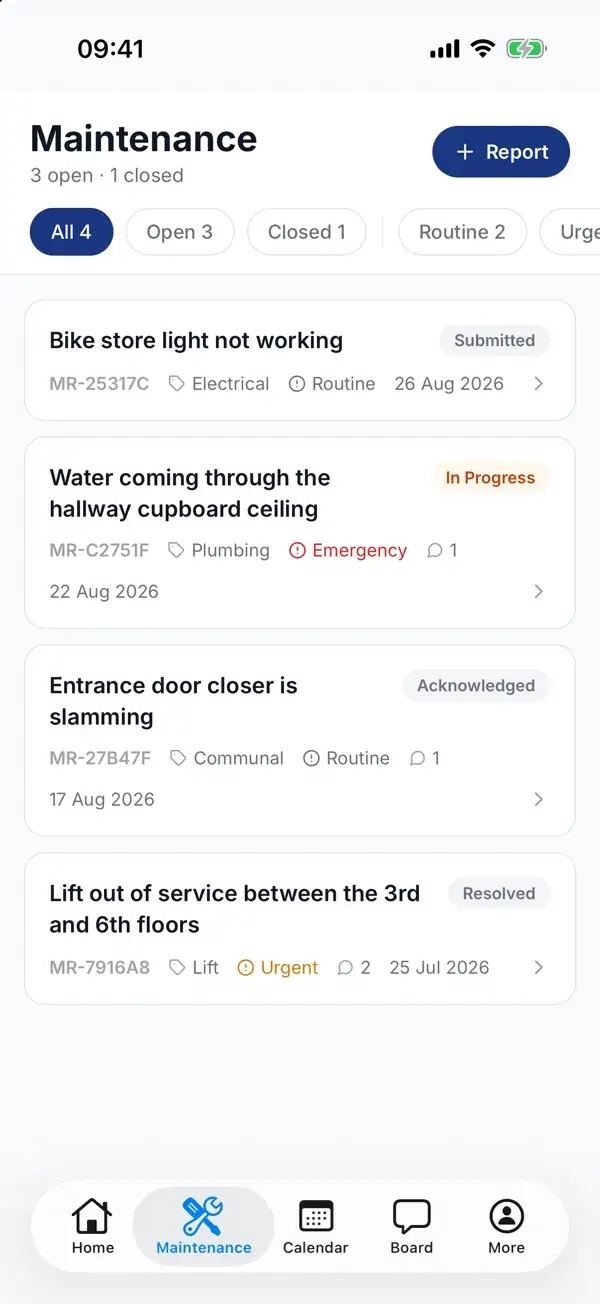
A resident's repairs in the WiseBlock app: three open and one closed, each with a reference, category, urgency, status and date, and a Report button.
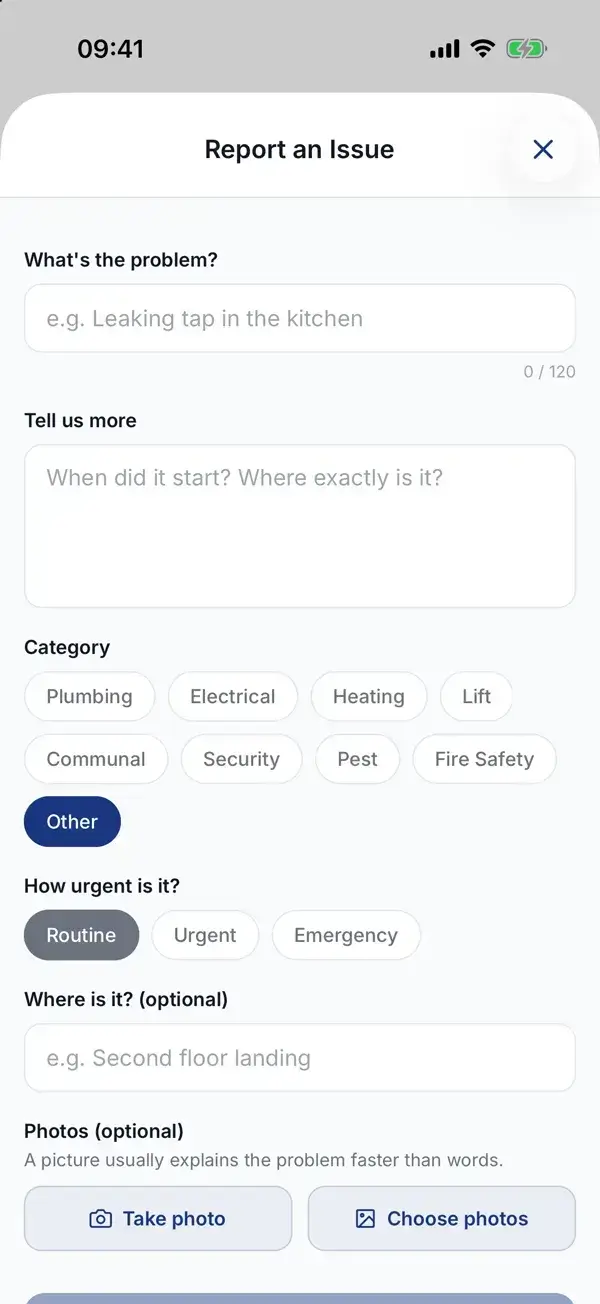
Reporting an issue in the WiseBlock app: what the problem is, more detail, a category, how urgent it is, where it is, and buttons to take or choose photos.

A resident's repairs, and the form they report one with. Screens from the WiseBlock app with demo data.

Sheet 01A repair, end to end

Watch a leak go from a photo to a finished job.

One photograph from a resident. The surveyor drafts the job, contractors price it, the budget and the limit are checked, the property manager approves, and the resident sees it resolved.

  1. Reported
  2. Analysed
  3. Quotes requested
  4. Quoted
  5. Approved
  6. Fixed

An illustrative example: the building, residents, contractors and figures are fictional.
Sheet 02Repairs reporting

Report a problem any way it arrives.

Residents report repairs from the resident portal or the mobile app, with photos attached, and the request lands on the right building and unit. They don't have to know who manages the block or which inbox to write to.

Not everything starts there. A fault rung in, emailed, spotted on a site visit or raised by a contractor already on the job is logged by your team in the same place, and every request records how it came in, so the list can be filtered by channel. A request doesn't need a resident behind it, but one claiming to come from the portal must have one.

Email is where repairs hide. The Email Triage agent sorts incoming building email by type, picks out maintenance, and flags the urgent ones to the person who should act. In the portal, the AI receptionist answers "how do I report a leak?" and points the resident straight at the form.

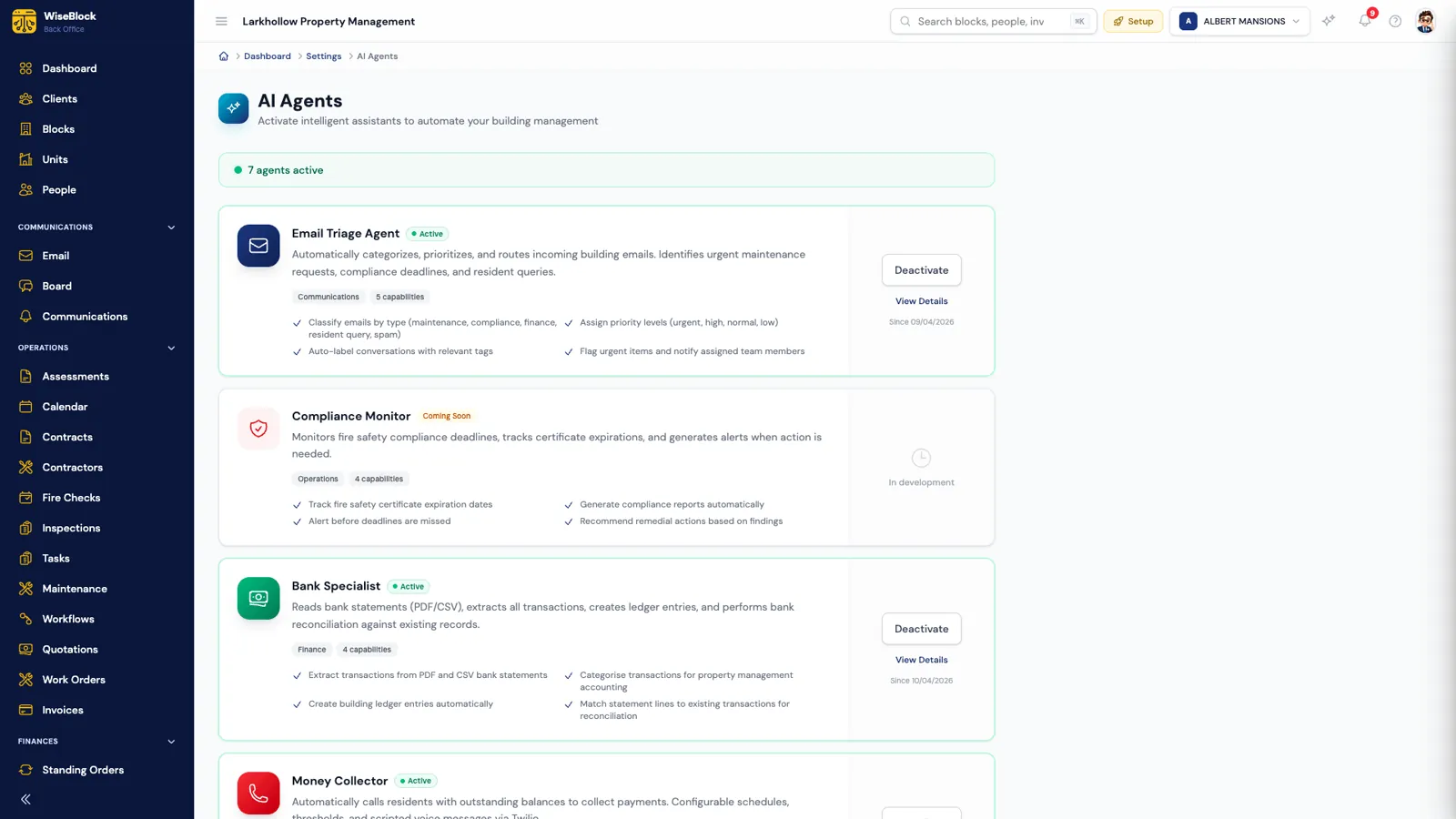
The AI agents settings page in WiseBlock, showing the Email Triage Agent as active with its capabilities: classifying emails by type including maintenance, assigning priority levels, labelling conversations and flagging urgent items to the assigned team member.
  1. Switched on per organisation.

    Each agent is activated in Settings, and can be switched off again just as easily.

  2. Maintenance picked out of the inbox.

    Emails are classified by type and priority, so a burst pipe doesn't wait behind a newsletter.

Sheet 03Triage and urgency

The surveyor drafts the job. You check it.

The Maintenance Surveyor agent reads the photographs attached to a request and writes the first draft of the job. Nothing it says is saved until a person has looked at it.

  • A title and a description

    What the fault is and where, written plainly enough for a contractor to price from.

  • Category and urgency

    Routine, urgent or emergency, so the jobs that can't wait rise to the top of the list.

  • Every trade the job needs

    Including access trades: a gutter three storeys up needs scaffolding as well as a roofer, and the draft says so.

  • An editable draft, not a decision

    Everything comes back into the form for your team to correct. You choose which fields it drafts, how many photos it reads (one to eight) and standing instructions for every request.

Sheet 04Contractor quotes

Verified local contractors, asked for a price with the photos.

  • Trade cover
  • Locality
  • Responsiveness
  • Rating
  • Price
  • Current workload

"Request a quotation" turns the job into a request for quotation that carries the scope, the site, the trades and the photographs, so nobody retypes the fault for each firm. Send one request for the whole job, for a lead contractor who subcontracts, or one per trade; every package stays linked to the same repair, with a running total of what's committed.

The Contractor Matcher agent shortlists who to ask. It scores each candidate on the signals listed here, read from your own quotations and work orders, and every score comes with its reasons. Firms covering the building's postcode area come first. A firm you've never used is scored neutrally rather than penalised, and you set the weights and whether unverified firms can be suggested.

Prices that arrive by email, phone or letter can be keyed in with the original attached, so the contractor counts as having answered.

Sheet 05Approval and budget

Approval limits and budget checks, before anyone says yes.

Work order management is where service charge money is committed. The check happens before the award, not when the invoice turns up.

  1. The whole job counts

    The approval limit is tested against everything already let on the same repair, so a £6,000 roof can't slip under a £2,500 limit as three £2,000 packages.

  2. Limits per building

    Set one approval threshold for the organisation and override it for any building that needs a different one.

  3. Budget heading shown

    Each job is charged to a budget heading. Before award, the quote shows what's allocated, spent and committed there, and what would be left.

  4. A person awards

    An award over the limit is refused until a named approver signs it off. The agents draft and suggest; they never award.

Sheet 06Resident updates

Residents see it move, without calling to ask.

Every request has a status timeline in the resident portal: submitted, acknowledged, in progress and resolved, with the date each step happened. Residents and your team message each other on the request itself, and internal notes stay internal.

When the work is finished, the work order is marked finished and the contractor's invoice can be approved against it, charged to the same budget heading the job started under. Jobs that are done with can be archived out of the everyday lists without being deleted.

Questions

Maintenance management, answered.

Does the AI decide which contractor gets the job?

No. The Maintenance Surveyor drafts the job and the Contractor Matcher suggests who to ask, with its reasons. Awarding a quotation is always a person's decision, and over the approval limit it needs a named approver as well.

Can we log repairs that come in by phone or on a site visit?

Yes. Your team can log a job by hand and record whether it came by phone, email, a site visit or from a contractor. Photos can be attached and the surveyor will draft from them just the same.

How does the approval limit work on jobs split between trades?

The limit is tested against the whole job: everything already let on the same repair is added to the new price. Splitting a job into packages doesn't get it under the limit.

Do we have to use contractors WiseBlock suggests?

No. The shortlist is a suggestion. You can invite any contractor on your books, including ones you've never used through WiseBlock.

What does the resident see?

Their request, its status timeline from submitted to resolved, and the messages your team sends them on it. Notes your team marks as internal are not shown to them.

Next step

See a repair go from photo to fixed on your own blocks.

A 30-minute demo on a portfolio like yours: fire safety, repairs, residents and service charges, with the agents switched on.